
12 Ways to Fix QuickBooks Can’t Start Because It is Already Running
In QuickBooks, the error ”QuickBooks can’t start because it is already running” happens many times whenever any of the QuickBooks files are conflicting with any other software. It shows you that you are not able to start the QuickBooks as it is already running. So in this case, you have to check that if in the background any of the QuickBooks files or the QuickBooks software is running or not.
Here, you get to know how you can resolve the QuickBooks error, what are its causes and symptoms. Everything is explained in this article so that you can implement the solutions to fix the problem on your own.
List of reasons that causes the error “QuickBooks can’t start because it is already running”
- The hard disk is corrupted or damaged
- QBWUSER.INI file is misplaced
- The company name is too long
- The Windows operating system is not updated
- Installation of QuickBooks Desktop is not done properly.
What are the symptoms that you face before an error “QuickBooks can’t start because it is already running” happens?
- The QuickBooks software got frozen whenever you try to run the program
- The input is slow from the keyboard and mouse
- The Window system as running slowly
- Quickbooks company file is unable to open
- The system hangs every time you try to do something into your QuickBooks account.
Exact error shown
Error messages display on your screen are as follows:-
- QuickBooks can’t start because it’s already running in your system. Only QuickBooks Accountant and QuickBooks Enterprise can open two or more company files.
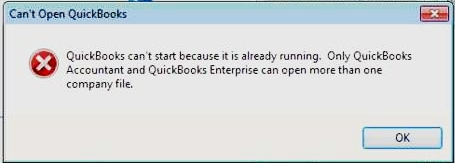
- The empty QuickBooks window already exists so quick is going to use that window.
- QuickBooks is not open. Please open it and then try again.

- Problem: QuickBooks but not started because it is already running the max number of files or instances.
Solutions to Fix The QuickBooks Can’t Start Because It is Already Running
1. Solution One: Download and install the latest update of QuickBooks
- Download the QuickBooks latest version from a good source or mention the link here to download
- Save the downloaded file into your computer
- The file is saved in the default location that is Downloads folder
- After successful download, open the File Explorer
- Go to the Downloads folder
- Then double-click on the downloaded file of QuickBooks update with .exe extension
- Follow the instructions followed by the Next button to update your QuickBooks software
- When done, click on the Finish button
- After that, the installation is done to the latest version of QuickBooks Desktop.
2. Solution Two: Update QuickBooks desktop from current software version
- Firstly, close the Company files opened in QuickBooks
- Then close the QuickBooks software
- Go to the QuickBooks icon then right-click on it
- Select Run as Administrator from shown options
- On the No Company Open Screen
- Click on the Help menu option
- Then choose the option Update QuickBooks Desktop
- On the open window for the update, click on the Options tab
- Tick mark the checkbox named Mark All
- Hit on the Save button
- After that, click on the Update Now tab
- Select the checkbox Reset Update
- When you are all set and implement the above steps, press the Get Updates button
- Restart your computer and then open QuickBooks to check for errors.
3. Solution Three: Restart your computer
- Open Windows Start menu
- Then click on the Power button
- Choose Restart option
- Wait for the computer to restart again
OR
- Press and hold Alt + F4 keys from your keyboard
- The window named Shut down window opens up on your screen
- Then select the Restart option
- After that, click on the OK button.
4. Solution Four: Open QuickBooks as an admin
- Close the QuickBooks software
- Go to the QuickBooks icon on your desktop or you can search for QuickBooks in the start menu search bar
- Then right-click on the QuickBooks icon
- Choose the option Run as administrator
- If it asks you to enter the credentials to login into your account then provide the correct ID and password for login.
5. Solution Five: Re-enable instant stat
In case you turned off the instant start to get into the QuickBooks before then you have to re-enable it after updating your QuickBooks account
- Click on the Edit menu into your account
- From the drop-down option, click on the Preferences option
- In the preferences window, click on the General icon
- Now select the My Preferences tab
- After that, click on the checkbox named “keep QuickBooks running for quick startups“
- Click on the OK button when you have set the preferences
- You have to close the QuickBooks software and then restart your computer properly.
6. Solution Six: You can also open QuickBooks now
You can easily get into QuickBooks if you don’t have time to install the update. to open QuickBooks now these steps are as follows:-
- Press and hold Ctrl + Shift + ESC keys from the keyboard
- It opens up the Task Manager on your system
- In task manager, click on the processes tab
- Search for the QBW32.exe process and then select it
- After selecting the process, press the End Task button
- When you are all said with the above steps then open the QuickBooks software into your system.
7. Solution Seven: To disable the Quickbooks instant start to resolve the issue
- In QuickBooks, click on the Edit menu option
- Then select from the options Preferences from further options
- In the open window, click on the General tab
- Then click on the My Preferences tab
- Remove the tick mark from the option “keep QuickBooks running for quick startups”
- Then click on the OK button when you are done with the above steps
- Now, you have to close the QuickBooks software
- In the end, restart your computer.
8. Solution Eight: Configure User Account Control (UAC) settings
- Open the Run window by pressing Windows + R keys together
- In the Run window, type the Control Panel
- Then press the Enter button from the keyboard
- In the Control Panel window
- Click on the User Accounts
- Further, selecting User Accounts (Classic View)
- After that, click on the Change User Account Control settings
- You have to move the slider according to your settings
- Set the slider towards Never Notify then click on the OK button to Turn the UAC Off
- Set the slider to Always Notify and hit on OK button to turn the UAC ON
- Restart your computer to refresh all the changes you have done.
9. Solution Nine: Close The Process of QBW32.exe
- Open the Task Manager window by pressing Ctrl + Shift + ESC keys
OR
Right-click on the Taskbar and then choose the Task Manager option
- In the task manager window, click on the Processes tab
- Search for the file QBW32.exe
- Then select QBW32.exe file and click on the End Task button
- You are done with closing the file that is running in the background. if you think that there are more files or QuickBooks software that is running in the background then close it
- Now restart your computer and then open the QuickBooks again.
10. Solution Ten: Rename the file that is causing the issue
- Open the File Explorer on your system
- Then Open the Folder that has all the QuickBooks files
- In this folder, search for the file that is causing the problem and to your
- Then right-click on the File
- Choose the Rename option
- Add the OLD at the end of the file name
- Then press Enter button to save the file name.
11. Solution Eleven: Repair QuickBooks Installation
- In the Windows system, open the Search bar of the Start menu
- Type Control Panel and then press the Enter button
- In the Control Panel window, click on the Programs and Features option
- Then click on the Programs option
- The list of installed applications open up
- Locate and select the QuickBooks program
- Click on Uninstall/Change option
- Choose Repair option from Uninstall Wizard
- Follow steps to repair the installation of QuickBooks Desktop
- When done, restart your computer.
12. Solution Twelve: Update Windows operating System
- In your Windows system, click on the Start menu button
- Then click on the Gear icon to open the Settings
- In the Settings Window, choose the option Update and Security
- In this, click on the Windows Update option from the left navigation panel
- Press button Check for updates
- You get the updates on your screen if there are any
- Click on Get Updates to download and install it
- Then you are done.
FAQs
-
Can I open the QuickBooks forcefully when facing issues “QuickBooks can’t start because it is already running” and what are the step to force open the QuickBooks?
Yes, you can try to force start the QuickBooks software. You can do it by pressing the Ctrl key and then open QuickBooks as Administrator. Release the Ctrl key when you get the No Company Open window.
-
Should I check the firewall or antivirus security to fix the error “QuickBooks can’t start because it is already running” happened?
Yes, you have to check the settings of firewall or antivirus security. Allow QuickBooks to perform all its operations without any blocking or interruption. You can also disable it while working with QuickBooks and after that enable the security.
-
Does clean installation helps to resolve the error “QuickBooks can’t start because it is already running”?
The clean installation helps you to fix the problem if it is because of the installation. In this, you have to perform the reinstallation of your QuickBooks software. Implement uninstallation of software; after that install the QuickBooks software again.